Administrative processes
You set up packages and you connect them. Your client does not see the whole picture anywhere
You set up a package at your clients, or you connect two of them: the journal entry goes from one to the other, the master data is exchanged. It does what it has to do. And still your client keeps a spreadsheet beside it for the margins, one for the planning, one for the commission and one for what he shows the management at the end of the month.
Those sheets and loose overviews are not there out of unwillingness. They are there because none of the packages shows the whole, and because custom work was too expensive for what it delivered. Your client knows himself that it is not the right solution. He just does not have a better one.
In three screens
This is what it looks like at one of your clients
Your client's sheet
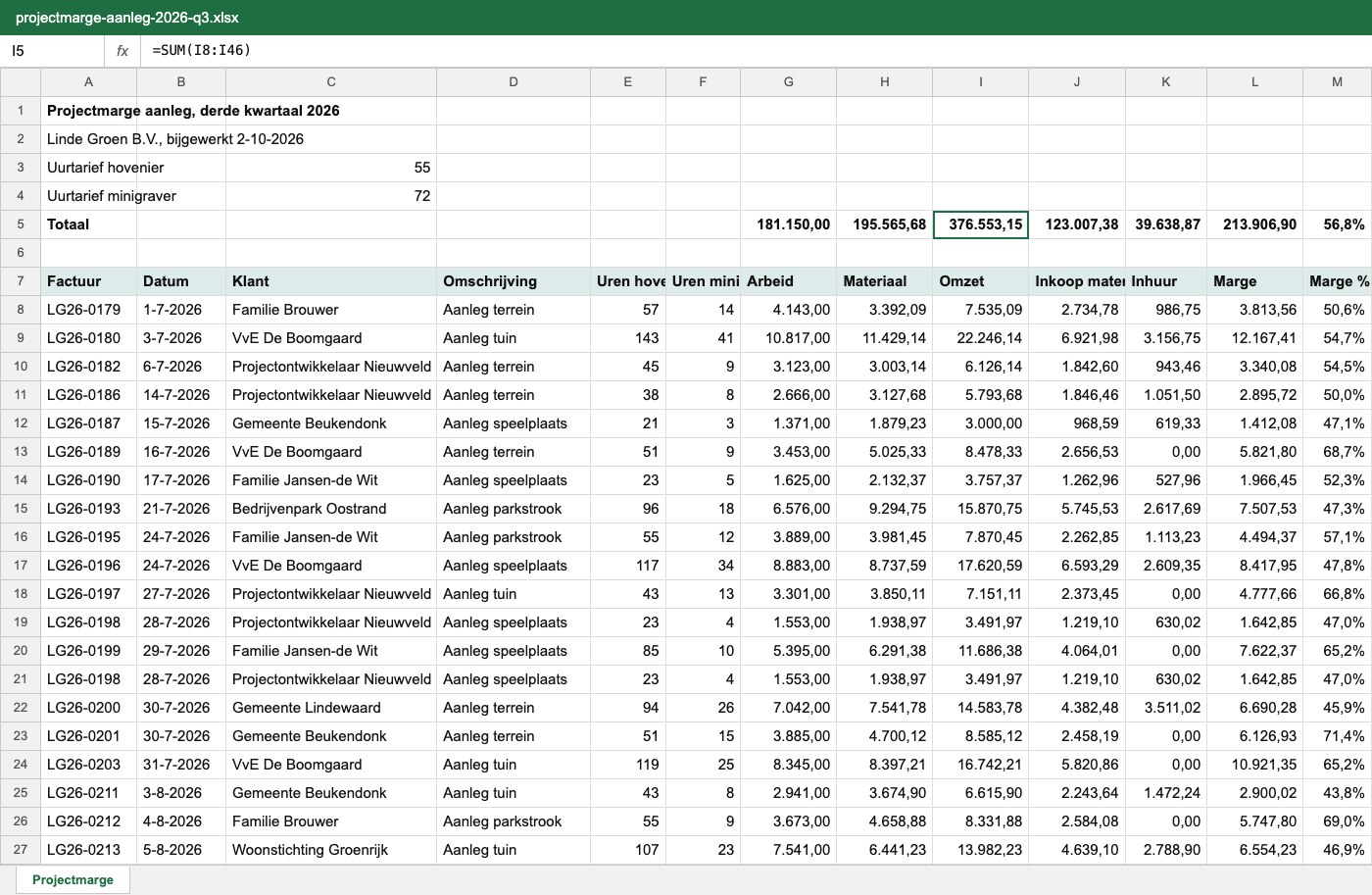
This is how your client tracks project margin: one row per invoice, four formulas and a total at the top. They steer by it, and nobody knows whether the total still adds up.
The same sheet, worked out
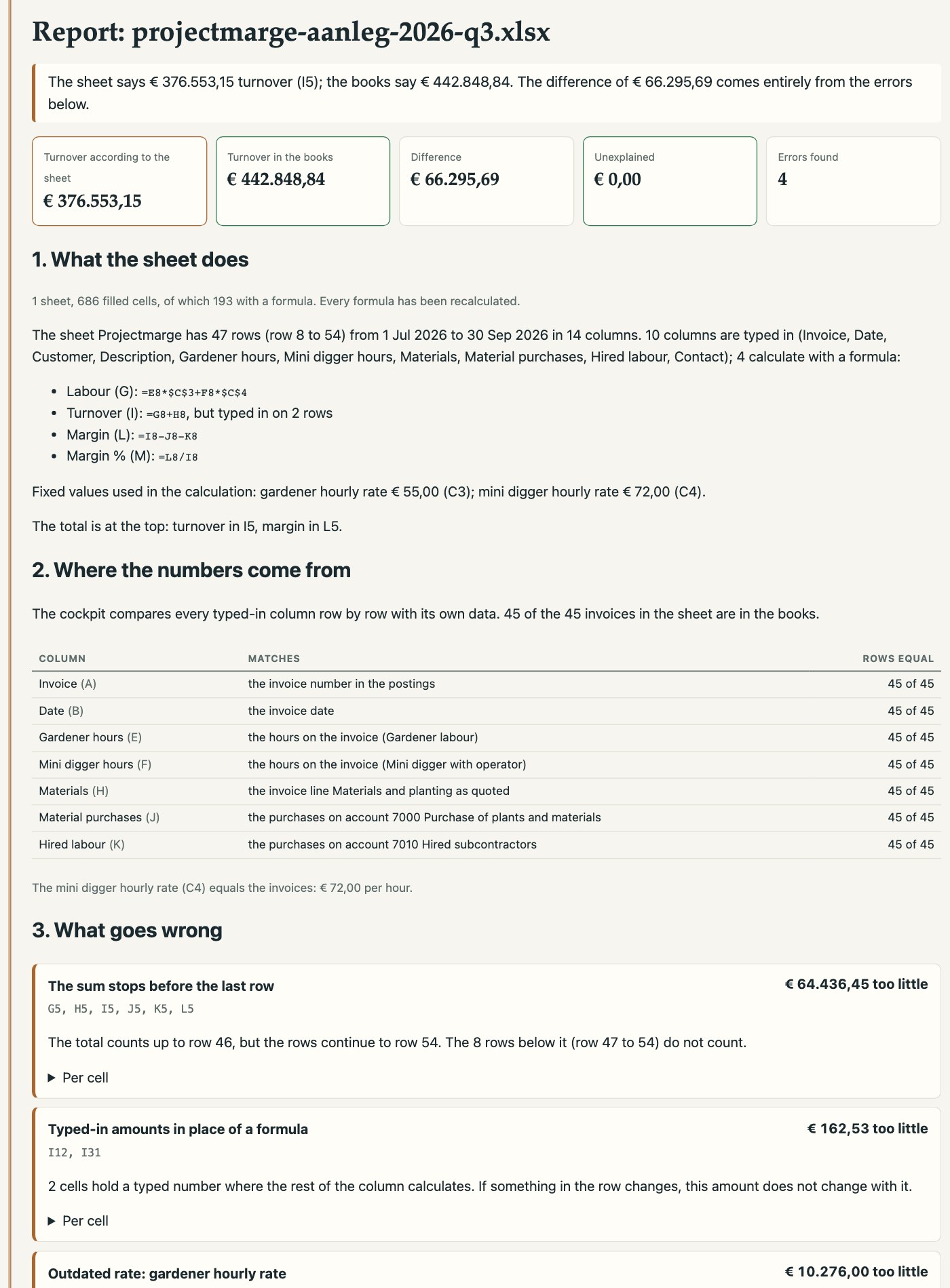
The cockpit recalculates every formula and puts every row next to the books. The difference with the administration is explained to the cent, error by error.
The result: a fixed part of the cockpit
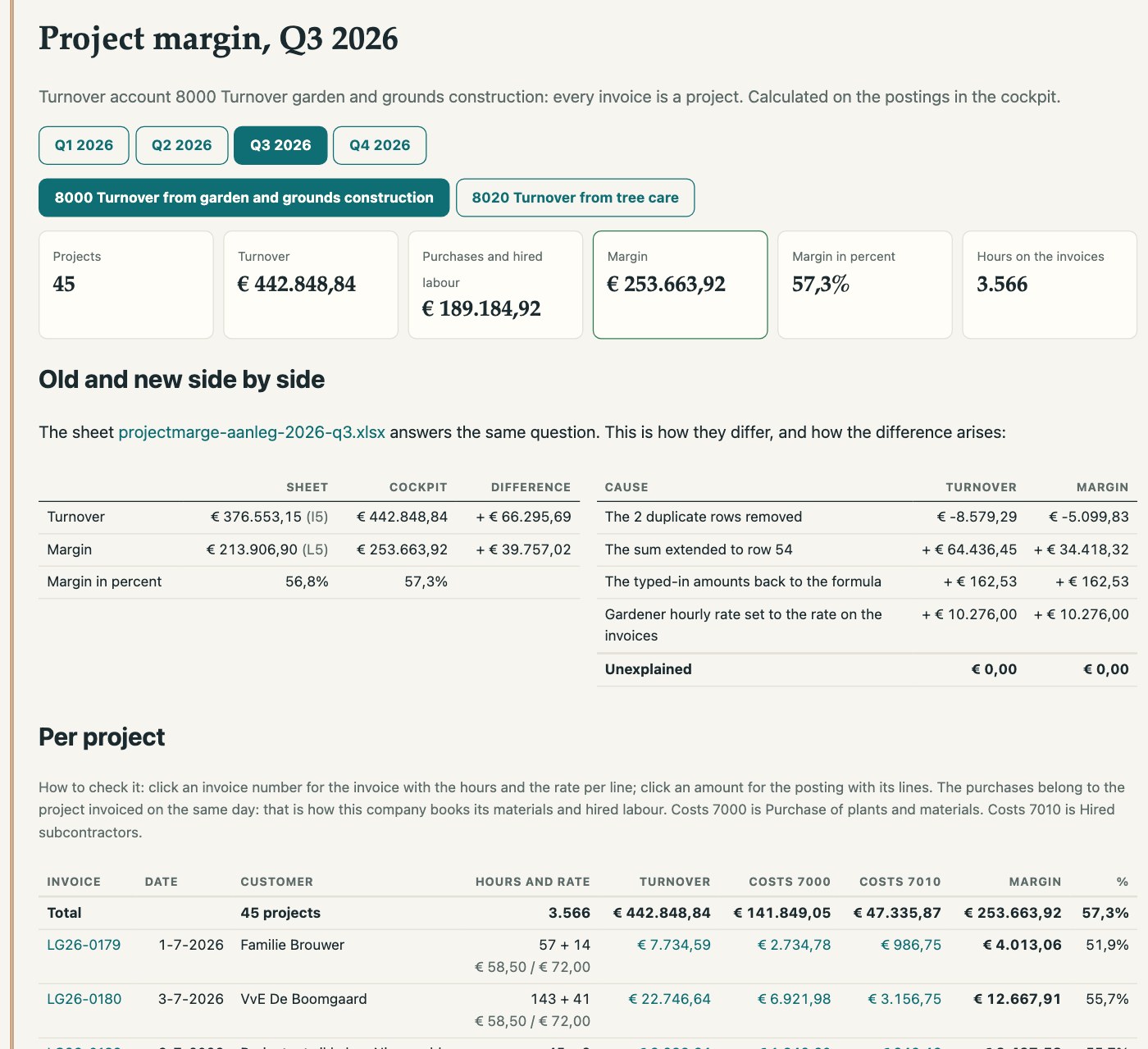
What the sheet did, the cockpit now calculates itself from the bookings, every month again. Old and new sit side by side, and nobody keeps a sheet up to date any more.
The screens come from the demo: a made-up family with made-up amounts.
What it costs your client now, and you
Every package is an island, and so is the sheet in between
- A connection moves data, but does not show it together anywhere. Anyone who wants to know what an order has earned looks in two packages and adds it up himself.
- The figures are retyped or pasted from the package. Every time that happens, something can shift without anyone seeing it.
- One person knows how the sheet works. If that person is not there, it comes to a standstill.
- The sheet and the package drift apart, and then the question is which of the two is right.
- And when it goes wrong, the question ends up with you, even though you have never seen the sheet. After all, it is your package the figures come from.
- For you it is work you leave undone: you see it at every client, and you have nothing to offer for it.
What the cockpit puts in its place
One place where the data from all packages comes together
Whoever connects two packages already has the door to the data of both open. You now do one thing with it: move it. In the cockpit it can also be put side by side, with the financial figures that are already there.
- Insight across the packages. The financial figures beside the data from the package where the work is done, in one picture. That is not a button standing ready: we build it with you, per connection.
- Your client simply carries on booking in the package you set up. The cockpit only reads along, through the auditfile the package itself produces. An auditfile is a standard file holding all the entries and accounts of an administration; almost every Dutch bookkeeping package produces one. Nothing changes in your set-up.
- What now sits in a sheet becomes a fixed part. Your client shows his sheet, we write down with him exactly what it does, and build it on the figures that are already there. Nothing is retyped any more.
- First old and new run side by side. Your client lays the two outcomes side by side, and only stops using the sheet when they are exactly equal.
- Every amount can be traced. In a sheet a number is a number. Here you click an amount and see the accounts and the individual lines it is made up of.
- And the documents are with it. Contracts, policies and deeds in the file where they belong, beside the figures.
An example from the demo
A margin sheet that is not right, and what becomes of it
A landscaping company works out the margin on its landscaping projects in a sheet every quarter. The cockpit reads that sheet, recalculates all 193 formulas and lays the outcome beside the books. The company is invented, like everything in the demo. The sheet, the report and the part exist.
1. What the sheet says, and what the books say
According to the sheet, turnover in the third quarter is 376.553,15 euros. The books say 442.848,84. That is a difference of 66.295,69 euros, and the margin in the sheet comes to 56,8 per cent instead of 57,3.
2. Where the difference comes from
- The sum stops at row 46. The eight lines below it are not counted: 64.436,45 too little.
- In two cells a typed-in amount sits where the formula should be: 162,53 too little.
- The hourly rate in the sheet is 55,00, while the invoices charge 58,50. Over 2.936 hours that is 10.276,00 too little.
- Two invoices have been pasted twice: 8.579,29 too much.
Together that is exactly the difference. Unexplained: 0,00.
3. What becomes of it
Your client gets the report: what the sheet does, where the figures come from, the errors and what a fixed part delivers. That part is shown below: the margin per project, calculated on the entries that are already in the cockpit. Nothing is pasted any more. A click on an invoice number gives the invoice with the hours and the rate, a click on an amount gives the entry. The sheet and the part stand side by side, with the difference per error, until the sheet can be closed.
The report
The part that replaces it
From the demo: invented company, invented amounts. Click an image to see it enlarged.
And at your clients
You remain the one who knows the client
You use the cockpit at the clients where you come across the sheets and the loose overviews. You know their processes and their packages, we build the part. Per client and per administration, without anything changing in the package.
And if you yourself have more than one company or a holding above them, the cockpit works for you just as it does for them.
What it costs you
What your client pays for looking, and what comes on top if the cockpit does the work
If the cockpit reads along with the package you set up, every administration costs 10 to 150 euros a month, by the number of lines. If the cockpit runs the process itself, from quotation to invoice, 15 euros a month per administration comes on top, plus an amount per item. A part or a connection we build with you is a one-off and is specified per client, after the first overview.
An example: an installation company that runs the process in the cockpit
| Looking, tier up to 10,000 lines, 12 × 35.00 | 420.00 |
| Made4us Administratie, surcharge, 12 × 15.00 | 180.00 |
| Purchase documents, 1,200 × 0.20 | 240.00 |
| Quotations, 150 × 5.00 | 750.00 |
| Work orders, 400 × 0.25 | 100.00 |
| Sales invoices, 500 × 0.25 | 125.00 |
| Per year | 1,815.00 |
About 151 a month. Amounts in euros, excluding VAT, with made-up quantities.
What you want to know
The questions automation specialists ask us
How do I replace a client's Excel report with an application?
Your client shows his sheet and we write down with him exactly what it does. After that we build it as a fixed part of the cockpit, on the figures that are already there. This is not there yet as a ready-made part. We build this with you.
How does a client know that the new report calculates the same as his old sheet?
First the sheet and the cockpit run side by side, on the same months. Your client lays the two outcomes side by side and only stops using the sheet when they are exactly equal. If there is a difference, each amount can be traced to the accounts and lines it comes from.
Which reporting layer can I offer my client on top of the package I have set up?
The Made4us Cockpit reads along with the package you have set up, through the auditfile the package itself produces. Your client simply carries on booking and nothing changes in your set-up. On top of that he gets a monthly overview, consolidation across several administrations and the parts that now live in loose sheets.
Can I show the data from two connected packages in one overview?
You can, but it is not there as a ready-made part. If you build a connection between two packages, you already have access to the data of both. That data can also go to the Made4us Cockpit, where your client's financial figures already are. Which data it is and how it is shown, we agree per connection. We build this with you.
Does my client have to switch to another bookkeeping package?
No. The Made4us Cockpit reads along with the bookkeeping package your client already uses, through the auditfile that package itself produces. Nothing changes in your set-up. If your client does want to let his bookkeeping package go, there is Made4us Administratie: from quotation to tax return, and the bookkeeping follows by itself.
What does it cost my client if the cockpit runs beside his package?
Looking costs 10 to 150 euros per month per administration, by the number of entry lines. A part or a connection we build with you is one-off work and is specified per client after the first overview: two weeks in which we import your client's figures and establish what is needed.
Can my client also ask for his figures without logging in?
Yes, by email. Your client emails his question to the Made4us Cockpit and gets the answer back by email, with the measurement below it. The figure comes from the same rules as the screen. If a question does not fit what the cockpit can measure, it says so, and no figure comes.
Why you can believe the figures
There is forty years of experience in administrative organisation in the rules. The layout is the annual accounts as they stand, not a model of our own. Click an amount and you see the accounts and the individual lines it is made up of. A difference is shown and not smoothed away, and if a figure does not match its source, the cockpit refuses to show it.
And who are we? We are business owners ourselves, with several companies. The cockpit was built because we needed this overview ourselves, and we work with it every day. So what we show you, we use ourselves.
Bring a sheet or a connection from one of your clients, and we will show what can be done with it. Half an hour, and it costs you nothing.
Free training
Learn to work with Claude yourself
The cockpit was built with Claude, by someone who knows the trade and not the technology. You learn how in thirty short lessons, with examples for people who work with figures. The lessons are in Dutch for now.